Your Passwords,
Anywhere You Go
Cloud-synced password manager with zero-knowledge architecture. Access your vault from any terminal, anywhere — then logout and leave no trace.
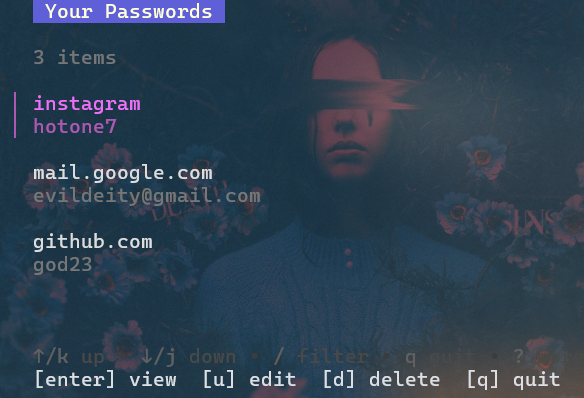
Access Passwords From Anywhere
Your passwords are locked in a browser extension on your main device? Not anymore.
SSH into Servers
Need database credentials on a remote machine? Just install pman and login.
Borrowed Computer
Quick access on a friend's laptop, then logout safely. No traces left behind.
Multi-Device Workflow
Same passwords everywhere without sync hassle. Works on any device with a terminal.
Terminal-First
No GUI needed. Works over SSH, on headless servers, and in minimal environments.
Zero-Knowledge Cloud Architecture
Your vault lives in the cloud. Encryption happens locally. We can't see your passwords.
You
Enter master password
Passman CLI
Local encryption
Server
Encrypted storage
Security Without Complexity
Enterprise-grade protection. Developer-friendly interface.
Cloud-Synced Vault
Your passwords live in the cloud, accessible from any device with a terminal. No sync hassle.
End-to-End Encryption
AES-256-GCM encryption before data leaves your device. Server stores only encrypted blobs.
Zero-Knowledge
Master password never transmitted. Argon2id key derivation resists GPU attacks.
Portable
Single binary, no dependencies. Download, login, use, logout — leave no trace.
Auto-Lock Security
Agent wipes encryption key from memory after 10 minutes of inactivity.
Cross-Platform
Native binaries for Windows, macOS, Linux, WSL2, and remote servers.
Interactive TUI
Beautiful terminal UI with keyboard navigation, search, and editing.
Self-Update
Update to the latest version with a single command: pman update
Powerful CLI
Full password management from your terminal.
-
pman auth registerCreate account -
pman auth loginAuthenticate -
pman createAdd password -
pman listBrowse vault -
pman auth logoutClean exit -
pman updateSelf-update
Military-Grade Protection
Industry-standard cryptography. Zero-knowledge by design.
E2E Encrypted
Local encryption before transmission
Zero-Knowledge
Server cannot decrypt your data
Auto-Lock
Vault locks after 10min idle
Open Source
Auditable codebase on GitHub
Your Passwords, Anywhere
Cloud-synced. Zero-knowledge. Open source.